Mac Security Recommendations


After my previous two blog posting about Macs having the most security vulnerabilities and Windows 7 being more secure than Apple's Snow Leopard OS for the Mac, I received requests for advice on how to secure the operating system. I compiled recommended security information that will help individuals harden their Mac OS, based on the level of security for their needs.
The SANS Top 20 Internet Security Problems, Threats and Risks, lists the top 20 security vulnerabilities across a wide array of Information technology platforms.
Make your self familiar with vulnerabilities in the SANS Top 20. It contains vulnerabilities and their mitigating controls for the most widely used Information Technology.
For more go to: http://www.sans.org/top20/
Vulnerability Catagories:
First thing, you must understand why we safeguard the operating system and where to find information on the most severe and common computer risks. After you become aware of the risks associated with your Information Technology, you then harden the system for your needs.
SANS Top 20 Internet Security Problems, Threats and RisksThe SANS Top 20 Internet Security Problems, Threats and Risks, lists the top 20 security vulnerabilities across a wide array of Information technology platforms.
Make your self familiar with vulnerabilities in the SANS Top 20. It contains vulnerabilities and their mitigating controls for the most widely used Information Technology.
For more go to: http://www.sans.org/top20/
Vulnerability Catagories:
Server-side Vulnerabilities in:
- S1. Web Applications
- S2. Windows Services
- S3. Unix and Mac OS Services
- S4. Backup SoftwareS5. Anti-virus Software
- S6. Management Servers
- S7. Database Software
Security Policy and Personnel:
- H1. Excessive User Rights and Unauthorized Devices
- H2. Phishing/Spear Phishing
Application Abuse:
- A1. Instant Messaging
- A2. Peer-to-Peer Programs
Network Devices:
- N1. VoIP Servers and Phones
Zero Day Attacks:
- Z1. Zero Day Attacks
Client-side Vulnerabilities in:
- C1. Web Browsers
- C2. Office Software
- C3. Email Clients
- C4. Media Players
S3. Section - UNIX/Mac OS Services
For more go to: http://www.sans.org/top20/#s3
S3.1 Description
Most Unix/Linux systems include multiple standard services in their default installation. Mac OS X often suffers from the same vulnerabilities as Unix systems, since it is based on Unix. Unnecessary services should be disabled, and all servers facing open networks should be protected by a firewall.
For services which provide remote login and/or remote service, traffic cannot be simply blocked by firewalls. Buffer overflow vulnerabilities and flaws in authentication functions can often allow a vector for arbitrary code execution, sometimes with administrative privileges, so gathering vulnerability information and patching rapidly are very important. Every year, buffer overflow vulnerabilities in Unix/Linux services are found.
For services which provide remote login and/or remote service, traffic cannot be simply blocked by firewalls. Buffer overflow vulnerabilities and flaws in authentication functions can often allow a vector for arbitrary code execution, sometimes with administrative privileges, so gathering vulnerability information and patching rapidly are very important. Every year, buffer overflow vulnerabilities in Unix/Linux services are found.
These services, even if fully patched, can be the cause of unintended compromises. Brute-force attacks against remote services such as SSH, FTP, and telnet are still the most common form of attack to compromise servers facing the Internet. Over the last couple of years a concerted effort has been made by attackers to recover passwords used by these applications via brute-force attacks. Increasingly worms and bots have brute-force password engines built into them. Systems with weak passwords for user accounts are actively and routinely compromised; often privilege escalations are used to gain further privileges, and rootkits installed to hide the compromise. It is important to remember that brute forcing passwords can be a used as a technique to compromise even a fully patched system.
Security-conscious administrators should use SSH or another encrypted protocol as their method of interactive remote access. If the version of SSH is current and it is fully patched, the service is generally assumed to be safe. However, regardless of whether it is up to date and patched SSH can still be compromised via brute-force password-guessing attacks. Use public key authentication mechanism for SSH to thwart such attacks. For the other interactive services, audit passwords to ensure they are of sufficient complexity to resist a brute-force attack.
Minimizing the number of running services on a host will also make it more secure. Many services have been used to further exploits.
Security-conscious administrators should use SSH or another encrypted protocol as their method of interactive remote access. If the version of SSH is current and it is fully patched, the service is generally assumed to be safe. However, regardless of whether it is up to date and patched SSH can still be compromised via brute-force password-guessing attacks. Use public key authentication mechanism for SSH to thwart such attacks. For the other interactive services, audit passwords to ensure they are of sufficient complexity to resist a brute-force attack.
Minimizing the number of running services on a host will also make it more secure. Many services have been used to further exploits.
The Most Exploited Mac Vulnerabilities of the Last 6 Months
SANS Top Cyber Security Risks, For more information go to:
http://www.sans.org/top-cyber-security-risks/
SANS Top Cyber Security Risks, For more information go to:
http://www.sans.org/top-cyber-security-risks/
The graphic below highlights the SANS Top Risks and Vulnerabilities being exploited on Macs now!
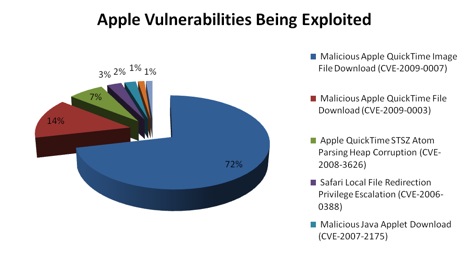
SANS Top Cyber Security Risks
Attacks on Critical Apple Vulnerabilities (last 6 months)
SANS Top Cyber Security Risks
Attacks on Critical Apple Vulnerabilities (last 6 months)
How to Harden the Mac Operating System
Now that you understand the treats, risks and countermeasures needed to safeguard your Mac system, we go on to implement control changes based on the level of security you want for your needs. Read through the following Mac OS X Security Guides to determine the level of security rigor for your needs. Additionally, I included some links from other sites that offer other hardening tips and recommendations.
Other Mac Hardening Reference Sites
National Security Agency (NSA) Mac Hardening Tips
University of Texas at Austin - Mac OS X Server Hardening Checklist
Corsaire Research provides the latest security intelligence
Macshadows - Advice on Mac System Harding
Mac OS X Security Configuration Guides - Taken from apple.com
The Security Configuration Guides provide an overview of features in Mac OS X that can be used to enhance security, known as hardening your computer.
The guides are designed to give instructions and recommendations for securing Mac OS X and for maintaining a secure computer.
To use these guides, you should be an experienced Mac OS X user, be familiar with the Mac OS X user interface, and have at least some experience using the Terminal application’s command-line interface. You should also be familiar with basic networking concepts.
Certain instructions in the guides are complex, and deviation could result in serious adverse effects on the computer and its security. The guides should only be used by experienced Mac OS X users, and any changes made to your settings should be thoroughly tested.
The Security Configuration Guides provide an overview of features in Mac OS X that can be used to enhance security, known as hardening your computer.
The guides are designed to give instructions and recommendations for securing Mac OS X and for maintaining a secure computer.
To use these guides, you should be an experienced Mac OS X user, be familiar with the Mac OS X user interface, and have at least some experience using the Terminal application’s command-line interface. You should also be familiar with basic networking concepts.
Certain instructions in the guides are complex, and deviation could result in serious adverse effects on the computer and its security. The guides should only be used by experienced Mac OS X users, and any changes made to your settings should be thoroughly tested.
Mac OS X v10.5 (Leopard)
Mac OS X v10.4 (Tiger)
Mac OS X v10.3 (Panther)
National Security Agency (NSA) Mac Hardening Tips
University of Texas at Austin - Mac OS X Server Hardening Checklist
Corsaire Research provides the latest security intelligence
Macshadows - Advice on Mac System Harding
Sign Up For Mac Security notifications - Taken from apple.com
For the protection of our customers, Apple does not disclose, discuss or confirm security issues until a full investigation has occurred and any necessary patches or releases are available. Apple usually distributes information about security issues in its products through this site and the mailing list below.
You can subscribe via http://lists.apple.com/mailman/listinfo/security-announce, also available via RSS.
Notifications developed by Apple are signed with the Apple Product Security PGP key. We encourage you to check the signature to ensure that the document was indeed written by our staff and has not been changed.
Finally
Hopefully you will find the security recommendations presented here helpful. My desire is to help ensure that you have pleasant computer and Internet experiences.
Enjoy,
Julius
For the protection of our customers, Apple does not disclose, discuss or confirm security issues until a full investigation has occurred and any necessary patches or releases are available. Apple usually distributes information about security issues in its products through this site and the mailing list below.
Mailing list
The Security-Announce mailing list is provided to obtain product security information from Apple.You can subscribe via http://lists.apple.com/mailman/listinfo/security-announce, also available via RSS.
Notifications developed by Apple are signed with the Apple Product Security PGP key. We encourage you to check the signature to ensure that the document was indeed written by our staff and has not been changed.
Updates
Check the Apple Security Updates page for released updates.Finally
Hopefully you will find the security recommendations presented here helpful. My desire is to help ensure that you have pleasant computer and Internet experiences.
Enjoy,
Julius