Sponsors

Sunday, July 25, 2010

Clark Thought Leadership Nominated for the 2010 Black Weblog Awards

I voted to have my blog, Clark Thought Leadership nominated in the 2010 Black Weblog Awards


We will see how this thing goes!

A sincere thank you to those who nominated my blog!

Julius


Friday, July 23, 2010

BDPA Charlotte Fan Page Demographics & Metrics

It will soon be a year since I created the BDPA Charlotte Facebook Fan Page and It has been a great experience for the BDPA Charlotte Chapter and especially for individuals who want to learn more about the BDPA or the Charlotte Chapter of the BDPA.


A Few Facts about the BDPA Charlotte Fan Page:
  1. Its the Largest Facebook Fan Page of any BDPA Chapter - at the time of this blog post 217 Fans!
  2. It aggregates the most BDPA News and Information Technology Topics Than any other BDPA Chapter.
  3. Many individuals use the BDPA Charlotte Facebook Fan Page to keep up with National BDPA, BETF Foundation, BDPA Technology Bloggers and News from other BDPA Chapters around the country.


BDPA Charlotte Fan Page Metrics

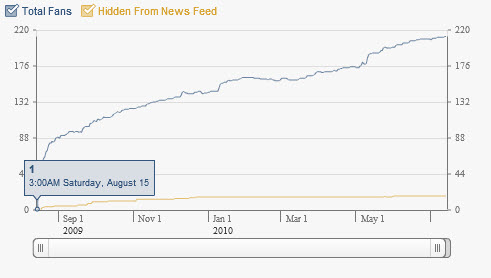
The BDPA Charlotte Facebook Fan Page has experienced great organic growth since its inception on Saturday, August 15, 2009. See Graph Below.


BDPA Charlotte Fan Page Demographics by:

  • Gender
  • Age
  • Country
  • City


Hopefully you will find the information and service that the BDPA Charlotte Fan Page Provides useful and hopefully makes you consider getting involved with a BDPA Chapter in your city; or reach out to create a BDPA Chapter in your city.

Sincerely,

Julius Clark, MBA, CISSP, CISA


Thursday, July 15, 2010

2010 National BDPA Technology Conference & Job Fair Fact Sheet

 2010 National BDPA Technology Conference & Career Fair Fact Sheet

If your are an IT professional and in need of Technology training or a Job make sure you attend the 2010 National BDPA Technolgy Conference & Career Fair

Date: July 28- July 31
Philadelphia, PA

Follow all 2010 National BDPA Conference News Tweets with this #BDPA #Event trending tracker –Bookmark this! http://bit.ly/cNXo4Z #STEM


Register for Conference Now!


>>> Download Fact Sheet <<<

Conference Fact Sheet 


Tuesday, July 6, 2010

Photocopier Security: We Gave Away Our Privacy to Digital Photocopiers


Question? How many times have you done the following:

  • Copied personal information at Kinko's
  • Used a lawyer who copies documents on a leased copier.
  • Have a healthcare institution that uses photocopiers to copy vital patient information and records.
  • Copied personal information like drivers licenses, social security cards, birth certificates at your place of work.
  • Copied personal document at the public library and stores like OfficeMax, Staples, etc.
How certain are you that the photocopier used to copy your information will be properly cleansed to avoid unauthorized access to your very private information?


CBS New conducted and investigative report into concerns regarding privacy exposure from digital photocopiers.


Summary of CBS Investigative Report

  • Digital photocopiers built since 2002 essentially are computers that scan and print documents. The copiers have a hard drives contain stored scanned images; often of your very personal information.
  • The investigators were able to retrieve tens of thousands of images containing confidential information.
  • The photocopiers never delete the scanned images and the average hard drive size of 30Gig can store hundred of thousand of images containing your personal information.
  • Some copier don't encrypt the images on the hard drive.
  • When the copier lease is up, the images are not necessarily erased returned to the leasing company; the next person that buys the used copier could possibly retrieve these images!
  • You can download free hard drive forensics software from the Internet that easily retrieve the scanned private documents from the hard drive.
This problem is so serious that Massachusetts Representative, Ed Marky sent an open letter to the Federal Trade Commission seeking a government involvement to prevent millions of people from having their personal and confidential information compromised by someone who would get access to a used photocopier.

See actual investigative report


Watch CBS News Videos Online

Consumer Reports Recommendations Lower Risk Due To Photo Copier Hard Drives

Make all copiers securely self-erase files

This threat results from copier manufacturers erring by designing copiers to retain the data they copy. The image of a copied page is needed only temporarily—so users can order additional copies of it without rescanning—and should be automatically erased by the machine when the next copying job is initiated. Dean Gallea, our lead computer tester here at Consumer Reports, emphasizes that the process needs to involve complete and secure erasure that wipes all traces of files from the hard drive. Still, he describes the necessary programming for such auto-erasure as “trivial and minimal” for manufacturers to implement.

Indeed, some copiers are already designed this way. But as an industry spokesman admits in the CBS video, they’re less popular because they cost more—an additional $500 in the case of Sharp copiers, the spokesman says—than regular models. The FTC needs to ensure that all copiers are designed to automatically erase the last file scanned whenever a new copying job is initiated.

Post warnings of the security risk of non-erasing copiers
Since it’s highly unlikely that all such copiers will soon be replaced, copiers that do not provide the security of erasure should be identified, and the risks of using them be identified.

Safeguards are needed when older copiers change hands

Industry and regulators must ensure that hard drives of non-erasing copiers are wiped clean before the copiers change hands. That’s easily done, by requiring the use of erasing software like that we recommend you use before you sell or recycle an old computer. Such programs digitally scrub the hard drive to remove the lingering traces of deleted files. An example is Eraser, a free program.

Copy sensitive documents at home
The copiers that are built into all-in-one printers hold copied data in a buffer, and only long enough to print it once. They offer the best option if you’re leery about copying sensitive data on a commercial machine, especially if and until the copying industry widely distributes more secure machines and better guidelines to protect copied data.

My Suggestions
  • Make copies of your private information when possible at home under your own control.
  • Ask the company, hospital, attorneys office, etc if you can see their policy regarding protecting the privacy of information.
  • Ask if they have a policy to erase or destroy the information on photocopiers after they are returned after the lease is up.
  • Stop using photocopies in public places and at the office to make copies of your personal information; you don't know who else may get access to it via a returned photocopier.
  • Businesses you are at risk for lawsuits if a digital photocopier you leased results in personal information to be compromised and used in nefarious ways; practice your due diligence and guarantee that the copier's hard drives get properly erased or destroyed.

References:

Consumer Reports
  • http://blogs.consumerreports.org/electronics/2010/05/photocopier-privacy-hard-drive-personal-sensitive-information-ftc-inquiry-markey-hackers-identiy-theft.html

CBS News Investigates
  • http://www.cbsnews.com/8301-31727_162-20002992-10391695.html


Saturday, May 22, 2010

Recovery.Gov -The first U.S. Government Wide Computing Infrastructure To Move To the Cloud

Track The Money in the Cloud


The U.S. Recovery Accountability and Transparency Board set history in May as the first U.S. Government wide computing infrastructure to move to cloud services.
Recovery.gov is charged with the responsibility for providing 100% transparency with all of those Stimulus Package dollars designated to give a boost our down economy. A visitor to the site can see where their tax dollars are being spent and where at.

$$BIG Savings$$

By moving Recovery.gov’s web infrastructure to the cloud, the government is saving over $750,000 during its current budgeting cycle and its estimated that even more money will be saved in the future.

Vendors Used

Amazon was selected as the cloud provider for this historic IT project. Amazon’s Elastic Compute Cloud (EC2) will provide much improvement over government owned systems.

Benefits Gained by the U.S. Government Moving to the Cloud include:

  • Efficient Computer Operations
  • Improved Security
  • Reduced Costs
  • Reallocation of scarce human and technological resources to more vital government IT projects.

Smartronix was the company selected to implement the project.

 “This is the first federal Website infrastructure to be fully hosted and accredited to operate on the Amazon EC2 and was achieved due to the transparent and collaborative working relationship between Team Smartronix and our outstanding government client.” - John Parris, CEO of Smartronix.

What Else is Gained by the Governments Move to the Cloud?


They main significance of the U.S. governments move to Amazon’s EC2 cloud services is growth of confidence. U.S. government officials and security experts have questioned the governance and security of cloud services. But civilian use of cloud computing is growing exponentially and is the hottest trend in Information Technology. A recent white paper by Lockheed Martin discovered that the U.S. government has huge misperceptions about cloud computing and are not comfortable with letting go of managing the physical aspects of their infrastructure.

The Lockheed Martin white paper states the following:

“Widespread lack of awareness and misunderstanding,” as well as “significant trust and governance questions” remain among government officials, who are far less likely then their civilian peers to know about or be using cloud computing software.

To download the full findings of the Lockheed Martin report visit:


Why the Hesitance?

The same Lockheed report from above found that those in the government who won’t embrace cloud technology suffer from lack of awareness, security and governance of cloud computing; thus stifling the governments usage of the growing technology, which also was found to be more perceptual than anything else.

I am happy of this milestone for the U.S. government. This move will help those in the government evolve and use cloud resources and technology wisely to provide better service for the citizens of this county. The risk involved with selecting Recovery.gov is mild and could only jeopardize the current administrations reputation than National Security or from Financial Loss.

Great work U.S!

References:

Amazon Helps U.S. Government Move To The Cloud
http://www.eweek.com/c/a/Cloud-Computing/Amazon-Helps-US-Government-Move-to-the-Cloud-883856

Cloud Computing is Misunderstood by Government

http://www.gsnmagazine.com/node/20625?c=cyber_security

Recovery.gov

http://www.recovery.gov/


Tuesday, May 18, 2010

20 Information Security Jobs With Major Swagger

IT Security jobs that have Major Swagger!

The SANS Top 20 Information Security Jobs that are too cool!
  1. Information Security Crime Investigator/Forensics Expert
  2. System, Network, and/or Web Penetration Tester
  3. Forensic Analyst
  4. Incident Responder
  5. Security Architect
  6. Malware Analyst
  7. Network Security Engineer
  8. Security Analyst
  9. Computer Crime Investigator
  10. CISO/ISO or Director of Security
  11. Application Penetration Tester
  12. Security Operations Center Analyst
  13. Prosecutor Specializing in Information Security Crime
  14. Technical Director and Deputy CISO
  15. Intrusion Analyst
  16. Vulnerability Researcher/ Exploit Developer
  17. Security Auditor
  18. Security-savvy Software Developer
  19. Security Maven in an Application Developer Organization
  20. Disaster Recovery/Business Continuity Analyst/Manager

Closer analysis of Information Security Job #10:


#10 is the job I currently have, ISO (Information Security Officer), and I must admit that you have a lot of authority to make things happen to mitigate the risks that businesses face. As an ISO you don't have the overall responsibility of the company's security Like a Chief Information Security Officer, but you are closer to the action before things are put in place. This allows you to ask lots of questions, properly document, review and test security controls and strategies; or just say no to a business decision around technology that is too risky.


CISO/ISO or Director of Security

http://download.101com.com/pub/cam/images/0407_security.gif


"Seems like I can get a lot done with little to no push back"

Job Description
Today's Chief Information Security Officers are no longer defined the way they used to be. While still technologists, today's CISO/ISO's must have business acumen, communication skills, and process-oriented thinking. They need to connect legal, regulatory, and local organizational requirements with risk taking, financial constraints and technological adoption.

Why It's Cool?

  •  "Authority always wins."
  •  "These people get to decide where to build the "watch towers", how many rangers are stationed in the park, where fires can be safely built, and the rules of engagement."

How It Makes a Difference

  • "You have the creative direction to influence and directly contribute to the overall security of an organization. You are the senior security player, the only one whom the CEO will trust."
  • "This position usually reports at a very high level, and gets to see and influence the big picture. You work with physical security, IT, the businesses, even the FBI and other law enforcement agencies."
  • "You are da Boss. You can pick and choose who does what, what gets done, and motivate and then share the credit with your people. You make a real impact on a daily basis."

How to Be Successful


Organizations succeed by taking risks, and they frequently fail because they then don't manage the risk-taking very well. The risks are business risks, and the security team needs to see business constituencies as "customers". The "this is how it's always worked" idea must be discarded. Data-driven decisions, devolving perimeter, any-device thinking, collaboration technologies, virtualization, and mobile data are diametrically opposed to prior thinking. Today's solutions are tomorrow's threat, and global and geopolitical landscape shifts are tightly coupled to intellectual and informational threats.

Experience is often the training ground, and diverse thought along with scenario planning is the requirement for a good outcome. Focus on the business goals: Never forget that this is the basis for security thinking.

For more information visit the SANS.org site:


Sunday, April 18, 2010

FBI Publications - A Parent's Guide to Internet Safety


A Parent's Guide to Internet Safety

Do you know how to handle the following issues if happening with your child?
  • Your child spends large amounts of time on-line, especially at night.
  • You find pornography on your child's computer.
  • Your child receives phone calls from men you don't know or is making calls, sometimes long distance, to numbers you don't recognize.Drawing -  Telephone
  • Your child becomes withdrawn from the family.
  • Your child is using an on-line account belonging to someone else.
  • What Should You Do If You Suspect Your Child Is Communicating With A Sexual Predator On-line?

http://mediterranean-media.com/images/parent.jpg

Most parents don't know the answers to the scenarios above that can involve their children, and that is where the FBI's publication: A Parents Guide to Internet Safety come in to help!

To read the FBI Publication - A Parents Guide to Internet Safety, please visit:
http://www.fbi.gov/publications/pguide/pguidee.htm

Down-loadable version:
http://www.fbi.gov/publications/pguide/parentsguide.pdf

Be safe!

Julius


Friday, March 26, 2010

The Cloud and E-Discovery: Lawyers Looking for a Needle in a Universe

The Cloud and E-Discovery: Looking for a needle in a Haystack Universe

Look at the challenge the legal system now has and the tools they use to find and secure information when they attempt to discover information for cases.


Tuesday, March 16, 2010

How Technology Saved The Art of DJing


The art of DJing was becoming more difficult to do because of the invention of the music CD; Music companies could produce 10 CDs for the same price of producing one vynl record. Finding Vynl (wax) records of popular songs and artists where becoming more difficult to get. Many people dont know that I actually DJ as a hobby and get lots of enjoyment from mixing, scratching and blending records.


I have been DJing as a hobby for over 16 years and the Serato Technology has made it much easier to continue to have this art form as a hobby.

Serato technology allows a DJ to use MP3s on a laptop and mix and scratch with two control records. The invention of the Serato Scratch Live technology saved the art of DJing and made the experience more enjoyable by REAL DJs with REAL skills! No more carrying crates of records any more! Time for getting back in the lab to come up with mad creations to make the party people dance!

Serato Scratch Live Diagram


http://themixingdj.com/images/102009-serato-scratch-live-setup.gif

Serato Scratch Live Box Contents

http://beatlabusa.com/images/Rane_Serato.jpg
DJ Jazzy Jeff Speaks About How Serato Scratch Live Saved DJing

DJ Jazzy Jeff tearing it up on the wheels of steel against the late DJ AM....RIP.

Finally, to see some of the nations top club djs do their thing on the wheels of steel check out the link below. Its the Mikidz Show with airs live on Mondays at 10 PM Easteran. You can also watch past shows too.
http://www.ustream.tv/channel/mikidzshow

Here is a video of a live DJ Mix show
http://www.ustream.tv/recorded/4387384


Enjoy,
Julius AKA DJ Juice!


Monday, February 15, 2010

All You Ever Wanted To Know About Joomla Security


https://www.palmettomastersingers.org/Joomla/images/stories/Links/Joomla_Logo_Vert_Color.png

All You Ever Wanted To Know About Joomla Security


Due to the time I spent rebuilding and cleaning up a recent Joomla hack and defacement of a web by an individual from the country of Turkey, I have become much more knowledgeable of Joomla security issues.

Looking through the monitoring statistics of the attacked site, it only took 4 minutes for the person hacking the site to compromise it; they found the site by searching for vulnerable Joomla 3rd party extensions which were installed in the site, which can get indexed on Google.

Joomla has become on of the hottest, easy to use, and simple to setup web site Content Managmet Systems  out there. With that, it has increasingly become the target of hackers. Just like Microsoft did with the popularity of the Windows Operating System, Joomla is reaping the success of developing software that helps people work and communicate more efficiently,  but at the cost of being on the radar for individuals who like to destroy and cause havoc on websites.

So for all of those looking for guidance on Joomla security I have provided a list of sources from various places that offer great Joomla security advance. The Majority of what you need to know about staying in the know and securing your Joomla site can be found here on my blog.


1)     Getting Started with your Joomla site
A.     Official Joomla Documentation

·   http://docs.joomla.org/

B.     How to Choose a Hosting Provider

·   http://docs.joomla.org/Security_and_Performance_FAQs

C.     Look at Ultra Secure Web Host Providers Like, FireHost.com a Secure Web Hosting Probider Who Defends against DDoS and Provides Top Notch, Corporate Enterprise Class Intrution Detection (IDS) & Intrusion Provention (IPS) Services.

2)      Install most up-to-date version of Joomla
·   http://www.joomla.org/download.html

3)      Test and Patch Joomla installation as Soon as a New Patch Update is Released
·   http://joomlacode.org/gf/project/joomla/frs/?action=FrsReleaseBrowse&frs_package_id=4947

4)      Rename admin account

5)      Change default password “admin” to a strong password

6)      Redirect Joomla Management Console Default
http://www.yoursite.com/administrator to something else by using a secure plug-in or something else. plugins/system/404.html

A.     Consider Using JSecure Authentication for Console Access and Re-Direction

·   http://extensions.joomla.org/extensions/access-a-security/site-security/5809

7)     Joomla Permissions  Give Write and Execute permissions only to files and folders that need them. See #12 below: Joomla Hardening.

8)      Don’t Use High Risk Joomla Extensions that appear on Vulnerablity Extensions lists
A.     Vulnerable Extensions List

·   http://docs.joomla.org/Vulnerable_Extensions_List

B.     U.S. Vulnerabilities Database: Enter Joomla or Names of Joomla Extensions

·   http://web.nvd.nist.gov/view/vuln/search?cid=1.

9)      Scan your Joomla site often to check for vulnerabilities
A.     OWASP’s free JoomaScan Vulnerability Scanner- Usage : Note to run on Windows, you will first need to install a Perl Distribution; Such as ActivePerl.  Real easy to install, then begin your scanning!

·   http://sourceforge.net/projects/joomscan/

·   Mailing List

·   Subscribe: https://lists.owasp.org/mailman/listinfo/owasp-joomla-vulnerability-scanner

·    or Use: owasp-joomla-vulnerability-scanner@lists.owasp.org

B.     Hacker Targets’ free web based Joomla site scanner

·   http://hackertarget.com/joomla-security-scan

·   Web site protection http://yehg.net/lab/pr0js/papers/MULTIPLE%20TRICKY%20WAYS%20TO%20PROTECT.pdf

10)   Disaster Recovery: Backup Your Site!

A.     JoomPack Site Back Up

·   http://extensions.joomla.org/extensions/1606/details

·   Restore JoomPack: http://joomlapack.net/download/itemlist/category/52-kickstart.html

11)   Create a Test Site on a Local Host/ Workstation Before Making Changes To Your Joomla Site
A.      Joomla Downloadable Local Host Instant Infrastructure!

·   http://demo.joomla.org- Jumpbox, TurnKey & Online Joomla Demo Site

B.      Manually Install/Setup a Windows Test/Development Joomla Environment

·   Part 1 -  http://docs.joomla.org/Setting_up_your_workstation_for_Joomla!_development

·   Part 2 -  http://docs.joomla.org/Setting_up_your_workstation_for_Joomla!_development_--_Part_2
C.      How To Copy From Host to Remote Host and Vice-Versa

·   http://docs.joomla.org/How_do_you_copy_a_site_from_localhost_to_a_remote_host%3F


12)   Joomla Website Hardening


A.      Joomla Security Guide

·   http://www.myjoomlasecurity.com/index.php/Main_PageCheck


13)   More Joomla Security Resources

A.      Joomla Administrators Security Checklist

·   http://developer.joomla.org/security/articles-tutorials/260-joomla-administrators-security-checklist.html

B.     Joomla Security Strike Team

·   http://developer.joomla.org/security.html

C.     Joomla Security FAQs

  http://docs.joomla.org/Category:Security_FAQ
D. Top 10 Joomla Security Problems and How To Avoid Them

·  http://joomplaza.com/index.php/tutorials/82-top-ten-joomla-security-problems---and-how-to-avoid-them

E. Top 10 Joomla Security Extentions

. http://hostingword.com/web-hosting-reviews/10-most-popular-joomla-security-extensions/

 If any of the above links disappear or are not working properly, please let me know. Thanks in advance!

Enjoy your Joomla Content Management Experience Safely and with no Headaches!

Sincerely,

Julius, CISSP, CISA

 In addition, if you are new to the IT Security field, or have no experience and want to change your career consult with me at:


Get Expert Advice!